
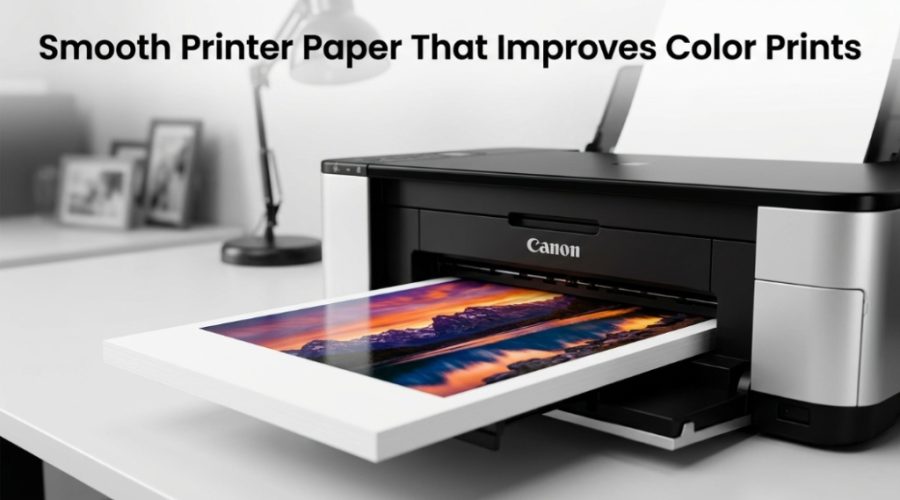
Using the right smooth printer paper can dramatically improve color accuracy, sharpness, and ink absorption in both home and office printing. If your prints look dull, blurry, oversaturated, or streaky, the issue is often not the printer itself — it is the paper. Smooth color printing paper allows ink and toner to settle evenly on the surface, producing cleaner gradients, sharper details, and more vibrant colors.
Why Does Smooth Printer Paper Improve Color Prints?
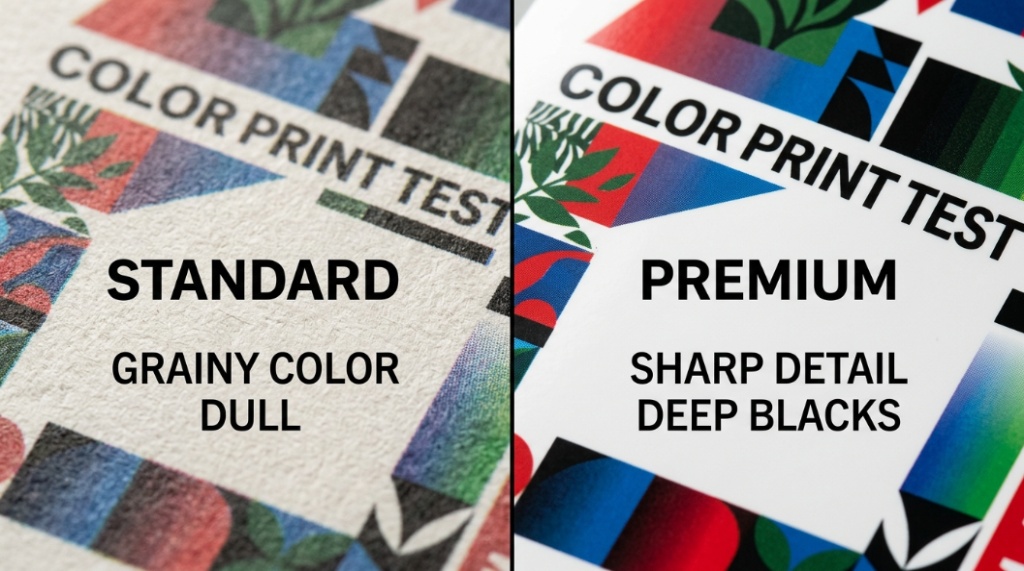
Smooth printer paper improves color prints because it creates an even surface for ink or toner distribution. A smoother finish reduces feathering, improves detail clarity, and helps colors appear brighter and more accurate.
Many people upgrade printers or replace ink cartridges when print quality drops. In reality, low-grade paper is often the hidden problem. Rough paper fibers absorb ink unevenly, causing bleeding, muted tones, and inconsistent textures. This becomes especially noticeable in photo prints, marketing materials, presentations, and high-resolution graphics.
Modern inkjet and laser printers are designed to work best with papers engineered for controlled ink absorption. Premium smooth paper includes surface coatings and fiber treatments that help ink stay near the surface rather than spreading deep into the sheet.
According to printing industry testing, coated smooth papers can improve image sharpness and color density by more than 25% compared to standard copier paper. This matters for businesses printing brochures, students printing presentations, and creators producing artwork or photography.
In simple terms, smoother paper equals cleaner dots, sharper images, and more professional-looking prints.
What Is Smooth Printer Paper?
Smooth printer paper is paper with a refined, low-texture surface designed to improve print clarity, color reproduction, and ink control.
Unlike standard office paper, smooth paper undergoes additional finishing processes such as calendaring, coating, or polishing. These processes flatten surface fibers and create a more uniform printing surface.
There are several common types:
- Glossy paper
- Matte coated paper
- Satin or semi-gloss paper
- Premium inkjet paper
- High-brightness laser paper
Each option affects how colors appear. Glossy paper delivers highly saturated images with deep contrast, while matte paper reduces glare and produces softer tones.
Smooth paper is widely used for:
- Photo printing
- Marketing brochures
- Business presentations
- Flyers and posters
- Art prints
- Portfolio materials
- School projects
How Does Ink Absorption Affect Print Quality?
Ink absorption directly affects sharpness, drying time, color accuracy, and smudging. Good color printing paper controls how deeply ink penetrates the sheet.
When paper absorbs too much ink too quickly, colors spread beyond intended boundaries. This is called feathering or bleeding. Text becomes fuzzy, and images lose detail.
When ink absorption is properly balanced:
- Colors stay vibrant
- Edges remain sharp
- Drying times improve
- Smudging decreases
- Ink usage becomes more efficient
Premium smooth printer paper uses special coatings to regulate absorption. Instead of soaking deep into fibers, the ink stays closer to the surface where colors remain vivid.
This is especially important for inkjet printers because liquid ink naturally spreads on porous surfaces. Laser printers benefit too because smooth paper improves toner adhesion and image consistency.
Does smoother paper use less ink?
Yes. Smooth coated paper often uses ink more efficiently because the ink stays near the surface instead of soaking into the fibers. This can reduce oversaturation and improve color consistency.
What Is the Best Paper Finish for Color Printing?
The best paper finish depends on the purpose of the print. Glossy paper delivers the most vibrant colors, while matte paper provides readability and reduced glare.
| Paper Finish | Best For | Color Vibrancy | Glare Level | Texture |
|---|---|---|---|---|
| Glossy | Photos, marketing materials | Very High | High | Very Smooth |
| Matte | Reports, portfolios, presentations | Medium-High | Low | Smooth |
| Satin/Semi-Gloss | Professional photography | High | Medium | Smooth |
| Standard Copy Paper | Basic office printing | Low | Low | Rougher |
If you want bold colors and sharp image detail, glossy smooth printer paper is typically the best choice. For documents that need readability under bright light, matte paper performs better.
Is glossy paper always better for color printing?
No. Glossy paper enhances saturation and contrast, but matte paper often produces more professional-looking business documents and reduces fingerprints and glare.
What Paper Weight Works Best for Color Prints?
Paper weight affects durability, ink handling, and perceived quality. Heavier smooth paper generally produces more professional results.
Paper weight is usually measured in GSM (grams per square meter).
- 80–100 GSM: Standard office printing
- 120–170 GSM: Presentations and flyers
- 200–300 GSM: Photos and premium marketing materials
Heavier paper feels sturdier and often includes better coatings for ink absorption. Thin paper can wrinkle under heavy ink coverage and may allow colors to show through the opposite side.
For everyday color printing, 120–160 GSM smooth paper offers a strong balance between quality and affordability.
Can thick paper damage printers?
Yes, if the paper exceeds your printer’s supported GSM range. Always check the printer manufacturer’s specifications before using heavyweight stock.
How Does Paper Brightness Affect Color Accuracy?
Higher brightness paper makes colors appear more vivid and improves contrast in printed images and text.
Brightness measures how much light reflects from the paper surface. Most premium color printing paper ranges from 92 to 100 brightness.
Benefits of brighter paper include:
- Cleaner whites
- Stronger contrast
- Sharper text
- More vibrant graphics
- Better photo reproduction
A smooth high-brightness sheet creates a cleaner visual foundation for color printing. Darker or lower-brightness paper can make colors look dull or muddy.
Many professional printing companies use bright white coated stock because it improves overall visual impact without changing printer settings.
Which Printers Benefit Most from Smooth Color Printing Paper?
Both inkjet and laser printers benefit from smooth color printing paper, but inkjet printers often show the biggest improvement.
Inkjet printers spray microscopic droplets onto the paper surface. Because liquid ink spreads easily, paper texture and absorption significantly affect output quality.
Smooth inkjet paper helps:
- Reduce bleeding
- Improve photo detail
- Increase color saturation
- Speed up drying
- Prevent smearing
Laser printers use toner and heat instead of liquid ink. Smooth paper still matters because it improves toner transfer and reduces uneven texture.
Can regular copy paper produce good color prints?
It can produce acceptable basic prints, but it will not match the clarity, vibrancy, or sharpness of premium smooth paper designed for color printing.
What Are the Most Important Features to Look for in Color Printing Paper?
The most important features are smoothness, coating quality, brightness, weight, and printer compatibility.
When shopping for paper, pay attention to:
- Surface finish
- Brightness rating
- GSM or paper weight
- Inkjet or laser compatibility
- Drying speed
- Opacity
- Acid-free quality
Acid-free paper is especially important for archival prints and photographs because it resists yellowing over time.
Opacity also matters. Higher opacity prevents show-through when printing double-sided documents.
Does Smooth Paper Improve Photo Printing?
Yes. Smooth paper dramatically improves photo printing by increasing image sharpness, color depth, and tonal transitions.
Photo printing requires precise dot placement and controlled ink absorption. Rough paper scatters ink unpredictably, which softens details and reduces clarity.
Smooth photo paper supports:
- Sharper facial features
- Better shadow detail
- Smoother gradients
- Deeper blacks
- Enhanced skin tones
Professional photographers often use resin-coated or microporous papers because they deliver faster drying and superior color accuracy.
Why do photos look dull on normal paper?
Standard paper absorbs ink too deeply into the fibers, which reduces surface color density and lowers contrast.
How Can Businesses Benefit from Better Color Printing Paper?
Businesses benefit from smoother paper because high-quality prints improve brand perception, readability, and customer trust.
Printed materials still influence buying decisions. A poorly printed brochure or presentation can appear unprofessional even if the design itself is strong.
Premium smooth printer paper improves:
- Marketing brochures
- Product catalogs
- Presentation handouts
- Sales sheets
- Business proposals
- Restaurant menus
Research in print marketing consistently shows that consumers associate print quality with brand quality. Crisp visuals and accurate colors create stronger first impressions.
For small businesses, upgrading paper is often cheaper and more effective than upgrading printers.
What Are Common Mistakes People Make with Color Printing Paper?
The most common mistakes include using low-quality copy paper, ignoring printer compatibility, and choosing the wrong finish.
Here are the biggest issues:
- Using thin paper for heavy graphics
- Printing photos on uncoated paper
- Ignoring recommended paper settings
- Mixing laser and inkjet paper types
- Storing paper in humid environments
Humidity can warp paper fibers and affect ink absorption. Proper storage in a cool, dry environment helps maintain print consistency.
Another overlooked issue is printer settings. Selecting the correct paper type in your printer software changes ink distribution and drying behavior.
Should printer settings match the paper type?
Yes. Printer settings optimize ink flow and heat levels based on the selected paper type, which directly affects final print quality.
How Can You Choose the Right Smooth Printer Paper?
The best smooth printer paper depends on your printer type, print purpose, and budget.
Here is a simple selection guide:
- For photos: glossy or satin photo paper
- For presentations: matte premium paper
- For brochures: semi-gloss coated paper
- For everyday color documents: bright smooth inkjet paper
- For laser printing: laser-certified smooth stock
If possible, test multiple paper types before purchasing in bulk. Different printers interact with coatings differently, especially in color-heavy applications.
Users printing graphics regularly should prioritize consistency, brightness, and controlled ink absorption over low cost.
Can Better Paper Reduce Printing Costs Over Time?
Yes. Higher-quality smooth paper can reduce waste, improve ink efficiency, and lower reprint rates.
Cheap paper often causes:
- Ink bleeding
- Paper jams
- Color inconsistency
- Smudging
- Reprints
When prints fail, businesses and home users waste both ink and time. Premium color printing paper may cost more upfront, but it often produces better first-pass results.
In offices with high print volume, fewer reprints can significantly reduce overall operating costs.
Conclusion: Is Smooth Printer Paper Worth It for Better Color Prints?
Yes. Smooth printer paper is one of the most effective upgrades for improving color print quality without replacing your printer.
The right color printing paper improves sharpness, boosts color vibrancy, controls ink absorption, and creates more professional-looking results across photos, presentations, brochures, and everyday documents.
Many print quality problems originate from poor paper selection rather than printer limitations. Rough, low-brightness paper absorbs ink unevenly and reduces detail clarity. Smooth coated paper solves these issues by creating a controlled printing surface.
Whether you print family photos, school projects, marketing materials, or business presentations, choosing premium smooth paper can make a visible difference immediately.
Start by matching the paper finish, weight, and coating to your printing goals. Small adjustments in paper quality often produce larger improvements than expensive hardware upgrades.
If you want sharper images, cleaner text, and stronger colors, upgrading your paper is one of the simplest and smartest printing decisions you can make.
Frequently Asked Questions About Smooth Printer Paper
What is the best smooth printer paper for vibrant color printing?
Glossy or satin-coated paper is generally best for vibrant color printing because it keeps ink near the surface, increasing saturation and sharpness.
Does smooth paper dry faster after printing?
Many premium smooth papers dry faster because they use specialized coatings that control ink absorption and evaporation more efficiently.
Is smooth printer paper better for inkjet printers?
Yes. Inkjet printers benefit greatly from smooth paper because it reduces feathering, improves dot precision, and enhances color accuracy.
Can smooth paper prevent ink smudging?
Yes. Properly coated smooth paper minimizes excess absorption and helps ink settle evenly, reducing smudges and streaks.
What GSM is best for color printing?
For most color printing applications, 120–170 GSM offers an ideal balance between print quality, durability, and printer compatibility.
Does paper brightness matter for photos?
Yes. Higher-brightness paper creates stronger contrast and cleaner whites, which improves overall photo appearance and color vibrancy.
Can laser printers use glossy smooth paper?
Yes, but only if the paper is specifically designed for laser printers. Standard inkjet glossy paper can melt or damage laser printer components
📌 Related Reads
Discover: Your Carpet’s Dirty Secrets
Explore: How to Build a Profitable Subscription-Based E-commerce Business from Scratch