
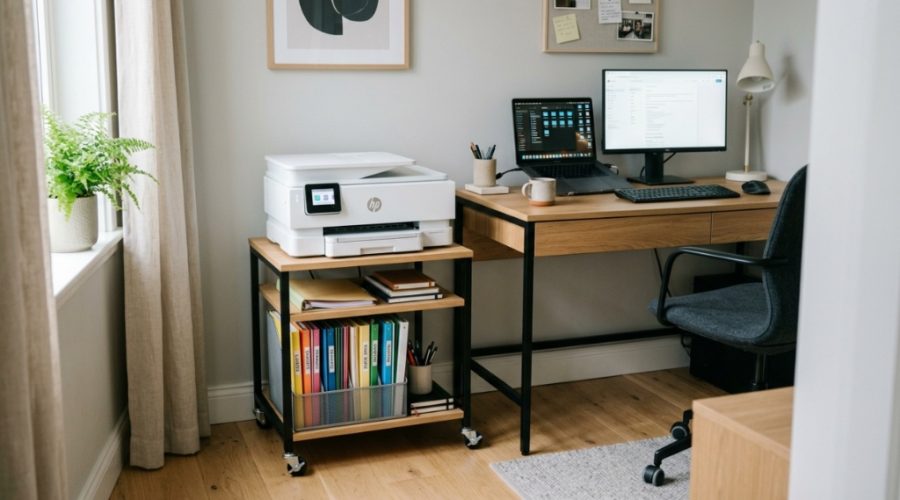
Does your home office feel more like a paper bomb went off than a productive workspace? You are not alone. One of the biggest challenges remote workers face is keeping physical documents, office supplies, and bulky equipment under control. The printer often becomes the culprit, taking up valuable desk space and creating clutter. The solution is not to get rid of the printer, but to elevate it—literally. A dedicated home office printer stand transforms wasted floor or desk space into a functional storage hub. This guide will walk you through exactly how to choose, set up, and organize your workstation using this essential piece of furniture.
Why Does a Dedicated Printer Stand Improve Office Organization?
A dedicated printer stand removes the machine from your primary work surface, instantly reclaiming critical real estate for your monitor, keyboard, and notepad. When the printer sits on your desk, it typically occupies 3 to 5 square feet of space that could be used for actual work. By moving it to a side stand, you create a dedicated zone for printing tasks while keeping your main area clean. This separation reduces visual noise and helps you focus on high-priority tasks without the distraction of a bulky machine staring at you. Furthermore, a stand with storage turns a single-function piece of equipment into a multi-purpose organizational asset.
What Features Should You Look for in a Printer Stand with Storage?
When shopping, you need to look beyond just the price tag. The best stands balance durability, size, and functionality. Focus on weight capacity, shelving configuration, and material quality.
Weight Capacity and Stability
Laser printers can weigh over 40 pounds. Ensure the stand you choose supports at least double the weight of your machine. Look for a steel frame or solid wood construction rather than particleboard, which can sag over time.
Shelving and Drawer Configuration
Decide what you need to store. Basic models offer one open shelf and a side file holder. More advanced options provide lockable drawers, adjustable shelves, and cubbies for binders. Think about your specific items: paper reams, ink cartridges, scissors, and envelopes.
Footprint and Mobility
Measure your available space precisely. A standard stand is about 23 inches wide and 18 inches deep. If you have a tight corner, look for a narrow design. Casters (wheels) are a huge plus because they allow you to roll the stand out for maintenance or cleaning.
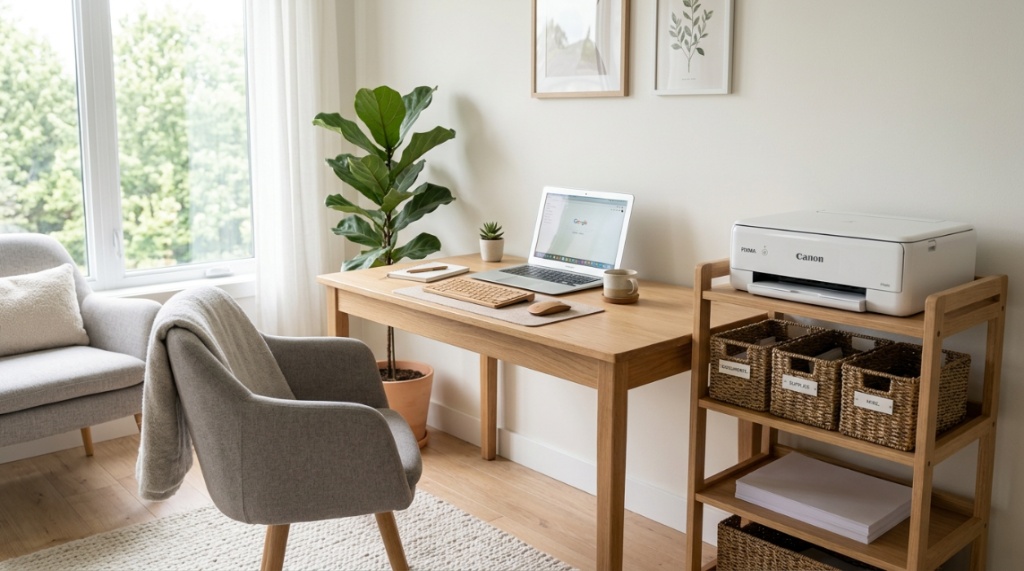
Can a Printer Stand Actually Reduce Desk Clutter?
Yes, and the effect is immediate. The moment you lift the printer off your desk, you eliminate the single largest physical obstacle on your work surface. Most household or small office printers have a footprint of about 400 to 700 square inches. Reclaiming that space allows you to spread out documents, use a larger monitor, or simply have a clean, empty area that feels less stressful. Furthermore, a stand with a shelf underneath gives you a designated spot for paper reams and supplies, keeping them off the floor and out of your drawers.
How Do You Choose the Right Size Stand for Your Office Layout?
Choosing the right size involves a simple three-step process: measure your printer, measure your space, and measure your storage needs. Start by measuring the depth and width of your printer. Add two inches to each side for airflow and cable clearance. Then, measure the corner or wall where you plan to put the stand. Ensure there is at least six inches of clearance behind the stand for plugs and paper feed. Finally, consider the height. You want the top of the printer to be at a level where you can easily access the output tray without straining—typically between 26 and 30 inches from the floor.
Which Storage Solutions Work Best on a Printer Stand?
The best storage solutions are those that match how you actually work. If you print documents daily, prioritize open shelves for paper trays. If you are a creative professional, prioritize drawer space for specialty papers and ink.
- File drawers: Perfect for hanging folders containing receipts, contracts, or client files.
- Open cubbies: Ideal for stacking reams of paper, shipping supplies, or large textbooks.
- Small pull-out bins: Great for loose items like USB drives, paper clips, and staples.
- Side pockets: Useful for magazines, envelopes, or a small waste bin.
How Can You Maximize Vertical Space with a Printer Stand?
Many standard printer stands are short, but you can turn them into a vertical storage powerhouse. If you have a tall ceiling or a wall nearby, use the top of the stand for stacking items in vertical file organizers or magazine holders. Better yet, place a small shelf unit next to or above the printer stand. This creates a “print station” where everything you need is within arm’s reach but off your main desk. Look for a stand with an open back or ladder-style design that allows you to see and access items stored vertically without pulling everything out.
Is a Rolling Printer Stand Better Than a Stationary One?
A rolling printer stand is almost always better for a home office where flexibility is key. Locking casters give you stability when you need it but allow you to move the entire setup to a different room or wall corner when your office configuration changes. This is especially useful if you share a space and need to tuck the printer away during video calls. Stationary stands are fine if you have a dedicated, permanent spot for the printer and do not anticipate moving it. However, for most users, the added cost of casters is worth the convenience.
How Do You Organize Cables for a Clean Setup?
Cable management is the secret to a professional-looking office. Printer cables are notoriously thick and rigid, but you can tame them with a few simple tools. First, plug all cables into a power strip that sits on the shelf below the printer. Use adhesive cable clips or zip ties to run the USB or network cable along the leg of the stand. If your stand has a back panel, drill or cut a small hole to pass cables through. For a truly clean look, bundle the excess cable length and secure it with a velcro strap. This prevents tangles and makes it easy to unplug the printer when needed.
What Are the Best Ways to Store Printer Paper and Ink?
Paper and ink have specific storage requirements to stay usable. Store paper flat on a shelf inside the stand to prevent curling. Keep it away from direct sunlight and humidity. For ink cartridges, store them in a cool, dark drawer. Do not open the sealed packaging until you are ready to install them, as exposure to air can dry out the print head. Use a small bin or drawer organizer to keep cartridges upright and separated by color. This saves you from digging through a messy drawer when you are in the middle of an important print job.
How Do You Set Up a Multi-Functional Workstation with a Printer Stand?
Creating a multi-functional station is about workflow logic. Place your printer stand to the right or left of your desk, within easy reach. On top of the stand, keep the printer and a small tray for outgoing documents. On the shelf below, store a paper ream and a “supply box” with ink and manuals. On the bottom shelf or in a drawer, store your “archive” files. This creates a linear workflow: bring paper from the bottom shelf, load it into the printer, collect the printout from the tray, and file it in the drawer. This system eliminates wasted steps and keeps your main desk a “thinking zone” only.
How to Maintain Your Printer Stand for Longevity
Even the best furniture needs care. Dust the top and shelves weekly with a microfiber cloth to prevent particles from getting into your printer. Check the casters every few months for hair or debris that can jam the wheels. If your stand has metal runners for drawers, apply a silicone lubricant annually to keep them sliding smoothly. Avoid placing heavy items like stacks of books on top of the printer itself. The stand is meant to hold the printer, not a library. Following this simple maintenance routine will keep your stand looking new and functioning perfectly for years.
A well-organized printer stand solves your storage issues, but physical comfort is the real backbone of productivity. While mapping out your physical layout, pair your storage solutions with the right seating. Check out our guide on How to Set Up a Home Office with an Affordable Ergonomic Chair to ensure your workspace is as comfortable as it is clutter-free.
Frequently Asked Questions
Can I use a printer stand for a different type of equipment?
Absolutely. A sturdy printer stand works great for heavy equipment like scanners, laminators, or even a coffee machine. Just ensure the weight capacity and surface size match your device.
How much weight can a typical printer stand hold?
Most mid-range stands support between 50 and 80 pounds. High-end metal or solid wood stands can hold up to 150 pounds. Always check the manufacturer’s specifications before placing heavy equipment.
Do I need to assemble the stand myself?
Yes, nearly all printer stands require assembly. Most come with clear instructions and the necessary tools. Plan for 30 to 60 minutes of assembly time for a standard model.
Is a printer stand worth the investment for a small home office?
Yes, particularly if you value desk space. The cost of a stand is far lower than the productivity loss caused by a cluttered workspace. It is one of the most cost-effective upgrades you can make.
Can I put a large multi-function printer on a small stand?
It is not recommended. The printer must fit fully on the top surface with at least two inches of clearance on all sides for ventilation and paper handling. Overhang can cause instability.
How do I clean a printer stand without damaging the finish?
Use a soft, damp cloth with mild soap for metal or laminate surfaces. For wood finishes, use a wood-safe cleaner. Avoid abrasive sponges or harsh chemicals that can scratch or discolor the surface.
Should I buy a stand with a drawer or an open shelf?
Choose a drawer if you need to hide small items like ink, staplers, and scissors. Choose an open shelf if you store larger items like paper reams, binders, or a shredder. Some users buy both by finding a stand with a drawer and a shelf.